Inbox Management
This section is used to add, edit and disable shared inboxes, which are shared by multiple users. To enable this feature, shared inboxes must be set up. Email addresses are optional and can be used to receive notifications. Inboxes being used in workflows cannot be disabled.
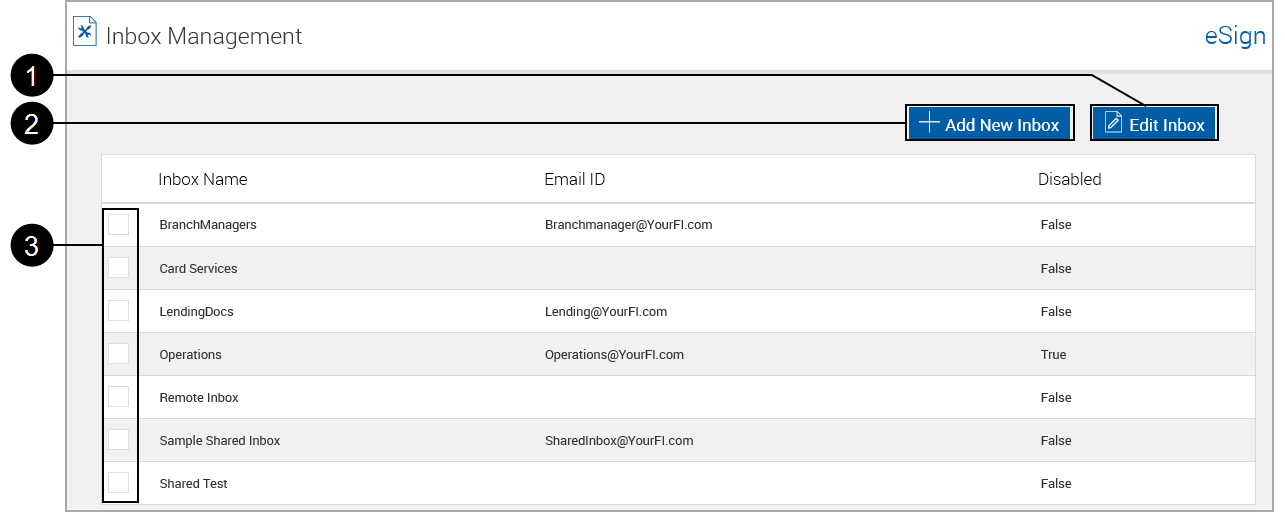
This list can be sorted by clicking on Inbox Name. Subsequent clicks alternate between ascending and descending order.

|
Edit Inbox: Used with (3) Selection Check Box to edit inboxes. |

|
Add New Inbox: Click to add a new inbox. |

|
Selection Check Box: Select an inbox to be edited with (1) Edit Inbox. |
Edit Inbox
Double-click an inbox row.
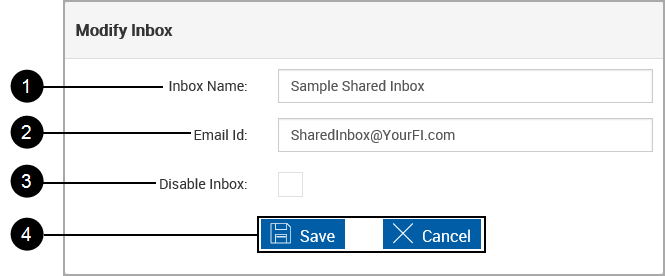
The Modify Inbox pop up displays.
|
|
Inbox Name: Reference name for the shared inbox. |
|
|
Email ID: Valid email address for the shared inbox |
|
|
Disable Inbox: Select this check box to disable the shared inbox. |

|
Action Buttons: These actions apply to the upper and lower parts of the page.
|
Add Inbox
Click Add New Inbox.
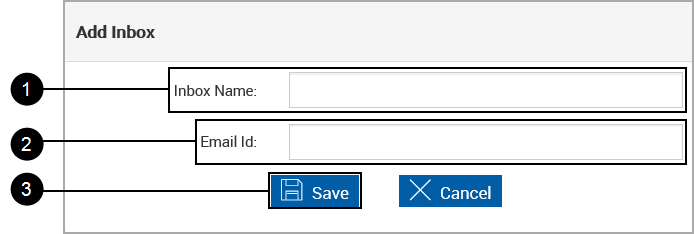
The Add Inbox pop up appears.
|
|
Enter an Inbox Name. |
|
|
Enter an Email ID |
|
|
Click Save. |