Using Calendars
 Start/End Date
In the Start Date and End Date fields, click the Calendar button ( ). The Calendar popup is displayed.
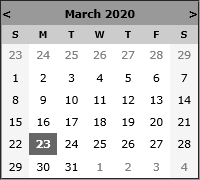
Use the < and > buttons to select the month and year.
- Click the day of the month. The calendar closes automatically when the date is selected.
- Click the Calendar button again to close the popup without changing the date.
 Date Formats Supported
|
The following Date Formats can be used for Sub Folder Name Format:
Not Allowed: yyyyMMM, yyyy MMM, yyyy-MMM, yyyy_MMM |
|||||||||||||||||||||||||||||||||||||||||||||||