Error Details Report
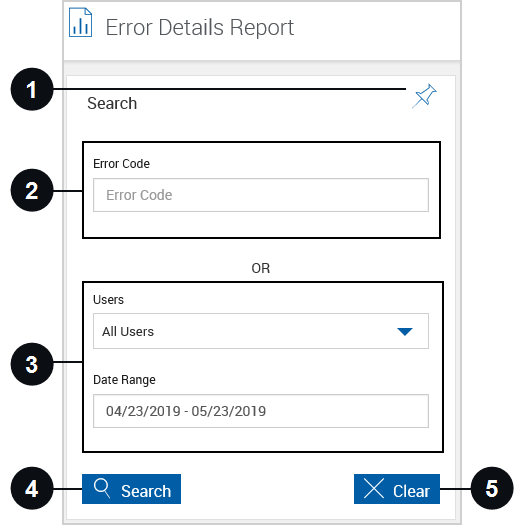
To open the Error Details Report page, click Reporting > Error Details. This report provides a limited listing of errors. Search using the Error Code field or search using the Users and Date Range fields. To generate an Error Details Report, enter the following information.

|
Pin Search Panel |
Click the Pin Search Panel icon to display or collapse the Search panel when the results are displayed. Alternatively, click the Search title row to display or collapse the Search panel at any time. |

|
Error Code | Search for a specific error code. If not searching using an error code, enter search parameters using the Users and Date Range fields. |

|
Users and Date Range | Search using the Users and Date Range fields. In the Users field, select a user. If left blank, reports for all users will be included. In the Date Range field, select a from/to date range for the report. If not searching using the Users and Date Range fields, enter search parameters in the Error Code field. |

|
Search | Search based on the selected parameters. |

|
Clear | Close the existing report and clear search parameters. |
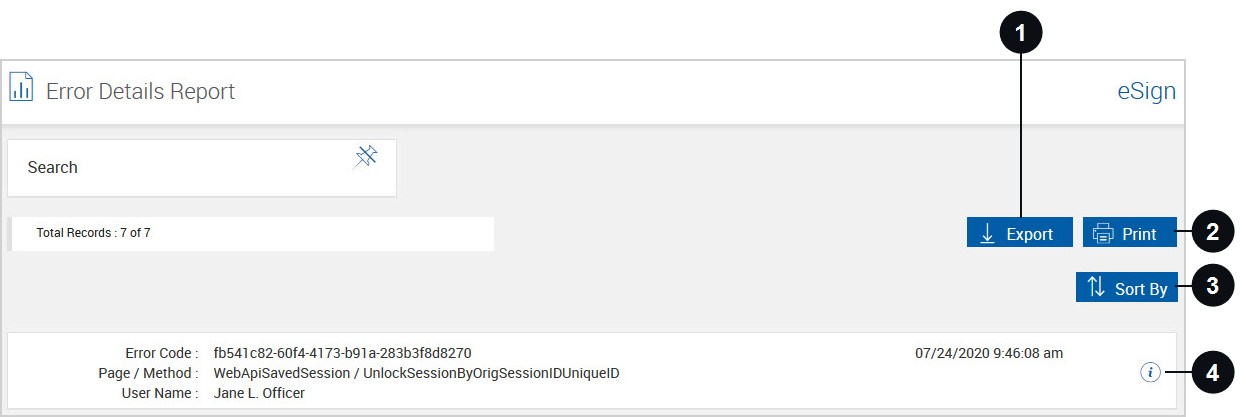
When Search is clicked, the Error Details Report page refreshes to display the results.
|
|
Export |
Export the Error Details Report to a .csv file. After clicking the Export button, a popup appears.
After opening the .csv file, the information can be manipulated using standard worksheet methods. |
|
|
View the Error Details Report and print the report from a PDF popup. If an Error Code is entered, that code is listed. If no parameters are listed, the report will contain a listing of all current error codes for your FI. Click Close to exit the popup and return to the Error Details Report page.
|
|
|
|
Sort By | Click to select the sort order. |
|
|
Error Contents |
Click the icon to view the Error Contents popup. Click Close to exit the popup and return to the Error Details Report page.
|

