Loan Coupons Report
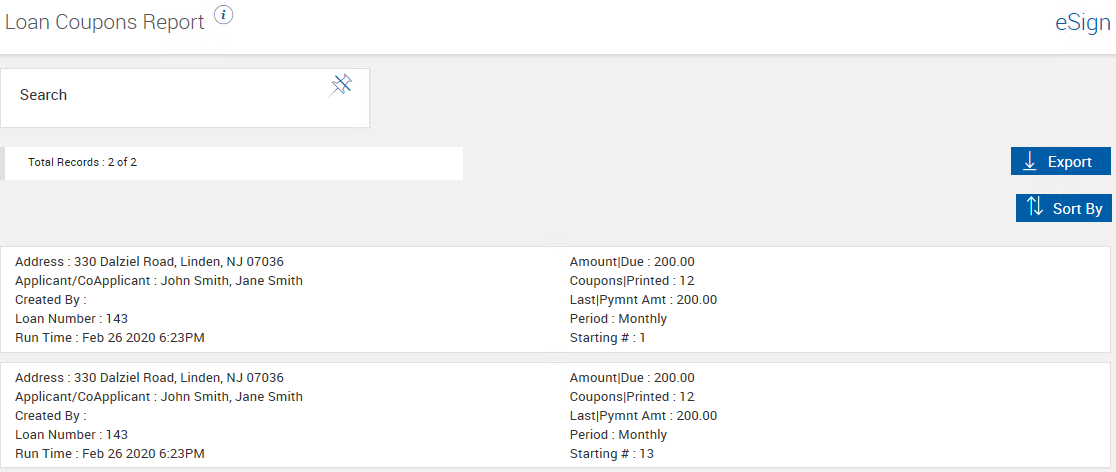
To open the Loan Coupons Report page, click Reporting > Loan Coupons. Depending on the entered search criteria, the Loan Coupons Report page generates a list of Loan Coupons created in the current reporting period. The default reporting period is 365 days. Use the Loan Coupons Report to review information and to assist generating new Loan Coupons. Refer to Processing Add-Ons for details about generating new Loan Coupons. These reports are only available if the Loan Coupons add-on is activated and if your administrator has granted you permissions. This page may not be applicable to your installation.
To generate a Loan Coupons Report, perform the following procedure on the Loan Coupons Report page:
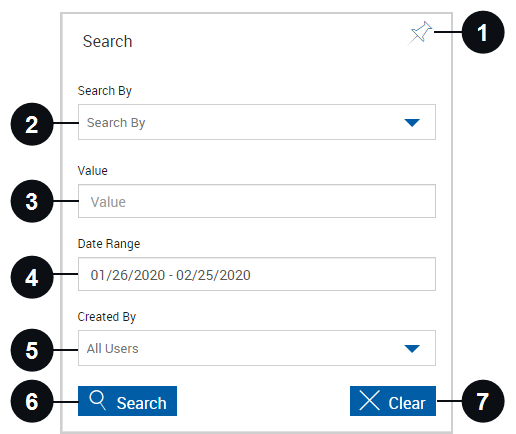
- Enter the desired search parameters in the Search panel. To search for all Loan Coupons available to you, make no changes to the Search panel fields. Up to 150 results can be displayed per page. Refer to Search Hints for more information about using wildcards. The features available to you on this page are set by the administrator. Some of the features shown may not be applicable to you depending on your installation.
-
Click Search to display sessions matching the search parameters. Click Export to view the search results in a CSV file format. Click Sort By to choose the order in which the search results will appear. The available sorting options depend on the settings configured by the administrator.
 Search Panel Details

|
Pin Search Panel |
Click the Pin Search Panel icon to display or collapse the Search panel when the results are displayed. |

|
Search By | Select a search criteria from the Search By dropdown. This field is required. |

|
Value | Enter a search string into the Value field. Wildcards are acceptable. The minimum value is the asterisk (*) and one additional character. |

|
Date Range | Search by specific date range. Click the field to display a calendar and adjust the date as desired. The default reporting period is 365 days. |

|
Created By | Click the field to search for Loan Coupons created by one or more specific users. Choose from the dropdown menu. Leave the field blank to search for documents owned by all of the users whose reports you can access. |
|
|
Search |
Click Search to display Loan Coupons matching the search parameters. |
|
|
Clear |
Click Clear to reset the search parameters and clear any existing results. |